Chat UI
Knox Agent is a native workbench pane, not a webview. Open it from the Activity Bar Knox icon, or ⌘L / Ctrl+L. There is no Chat vs Agent tab: Jev (when enabled) picks routing per turn; you stay in one transcript.
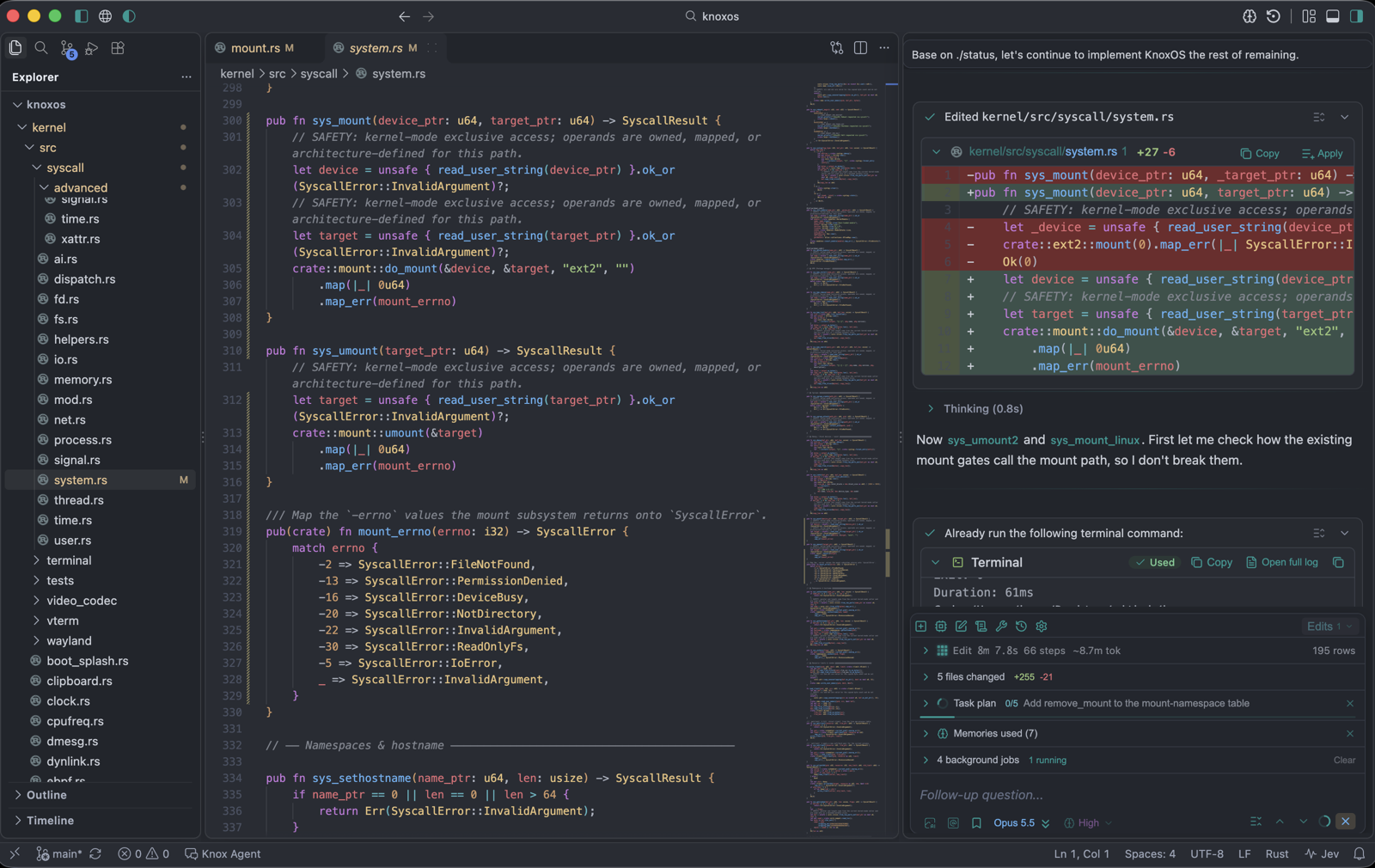
This page is the layout. How you type is Composer and context. How tools are approved is Permission modes.
Regions
Top to bottom in the sidebar:
| Region | What you see |
|---|---|
| Transcript | Your messages, Knox replies, thinking chips, tool cards. Landmark name: Chat transcript. Skip to composer jumps past a long log. |
| Agent meter | While a turn runs: activity kind (Thinking, Read, Search, Edit, Shell, Git, Task, Ask, Reply), step count, a rough token estimate. Thinking and Loading live here, not on the composer toolbar. |
| Panels | Task plan peek, background Jobs, git diff, queued messages, compaction banner, injected memories. |
| Composer | Permission bar, Plan, Run in background, model picker, editor, Send / Cancel. Landmark: Message composer. |
Dedicated Memory and Checkpoint Graph windows replace this chat chrome (no composer). Open them from the title bar (brain and graph icons, left of Customize Layout) or Knox: View Memory / Knox: Open Checkpoint Graph.
Session tabs appear only if you turned Show Session Tabs on and you have more than one tab. A single conversation hides the tab strip.
Transcript
- Your messages can be click-to-edit on the floating sent prompt, including while a reply is still streaming.
- Streaming replies can be selected and copied. Auto-scroll pauses on the first upward wheel so a live turn cannot yank the view.
- Thinking collapses to a compact chip so tool cards stay in view. Expand it if the model exposed reasoning.
- Tool cards stay on one header line. File edits show CheckPoint
+N/−N. Terminal cards cap at five lines (scroll for the rest). Copy command is on the card. - Ask-user cards are named questions: Approve / Deny, or a multi-step form (Next / Previous, freeform).
- Permission cards for a single tool: Approve, Always (rest of this chat), Deny.
- Failed tools show Tool call failed (and retry count). Cancel on a running card stops that tool and the generation.
There are no empty-chat “Try” sample chips in 2.2.
Agent meter
During a turn the meter shows what Knox is doing now and a running count of reads / searches / edits / tests.
| Chip | Meaning |
|---|---|
N steps | Tool rounds this turn. GUI default is unlimited; stop with Cancel. Background / /autonomous are capped. |
systems / rust | Resolved agent profile (systems / rust) when it is not the default app profile. |
~N tok | Estimate from prompt logs (characters ÷ 4) unless the provider reported usage. |
jev … | Last Jev route (and optional skill hint). Never file contents. |
| Doom loop | Repeated identical or failing calls. Change strategy injects a one-line instruction to pick a different approach. |
Cancel current generation is ⌘⌫ / Ctrl+Backspace while streaming (composer hint: Cancel current generation).
Overlays (gear / lump toolbar)
The lump toolbar opens overlays over the transcript, not a second window:
| Overlay | Icon | For |
|---|---|---|
| Models | cpu | Catalog, KnoxStudio / OpenRouter sign-in, Add Model |
| Rules | square-pen | Loaded instruction files |
| Prompts | scroll-text | Custom slash prompts |
| Tools | wrench | Tool groups, path & command policy |
| History | history | Sessions |
| Settings | settings | Agent knobs (not Memory → Recipes) |
Scroll in an overlay stays when the GUI rebuilds. Close it to return to chat.
Attached panels
| Panel | When |
|---|---|
| Task plan | builtin_plan has steps. Fraction done/total, Execute plan when you leave Plan mode. |
| Jobs | Background agents, long shell, subagents. Merge / Discard / Kill / Clear finished. Cap 2 concurrent background starts. Details: Background agents. |
| Queued messages | You typed while a turn was running. Send now or Interrupt and send. |
| Compaction | History was summarized (~75% context). Shows tokens saved. |
| Review edits | Mode popover chip is on. Held files, Apply / Discard per file. Shell still hits disk. Details: Review edits. |
Title bar (outside the pane)
| Control | Command |
|---|---|
| Memory (brain) | Knox: View Memory / title-bar Open Knox Memory |
| Checkpoint Graph | Knox: Open Checkpoint Graph |
| Language globe | Toggle Knox chat UI en / zh |
| Theme | Toggle light / dark (chat palettes include One Dark, Light+, high contrast) |
Accessibility
The pane has landmarks, a live transcript region, named permission / jobs / checkpoint / recipe chrome, and Skip to composer. Arrow keys move between checkpoint tabs. Built-in palettes are contrast-checked; a dedicated VoiceOver/NVDA pass is still a human check. The chat UI was tuned for One Dark.