KnoxChat Extension — The Agent. The Memory. The Solution.

Knox is an SI coding environment for VS Code — not a chat overlay. An autonomous agent, a local memory brain, and git-independent checkpoints share one session, so the model can plan, act, remember, and rewind as a single system.
Bring your own models. Anthropic Claude, OpenAI GPT, DeepSeek, Gemini, Qwen, Grok, GLM, Codestral, Sonar Pro, and Knox's On-Demand model knox/knox-ms are supported out of the box.
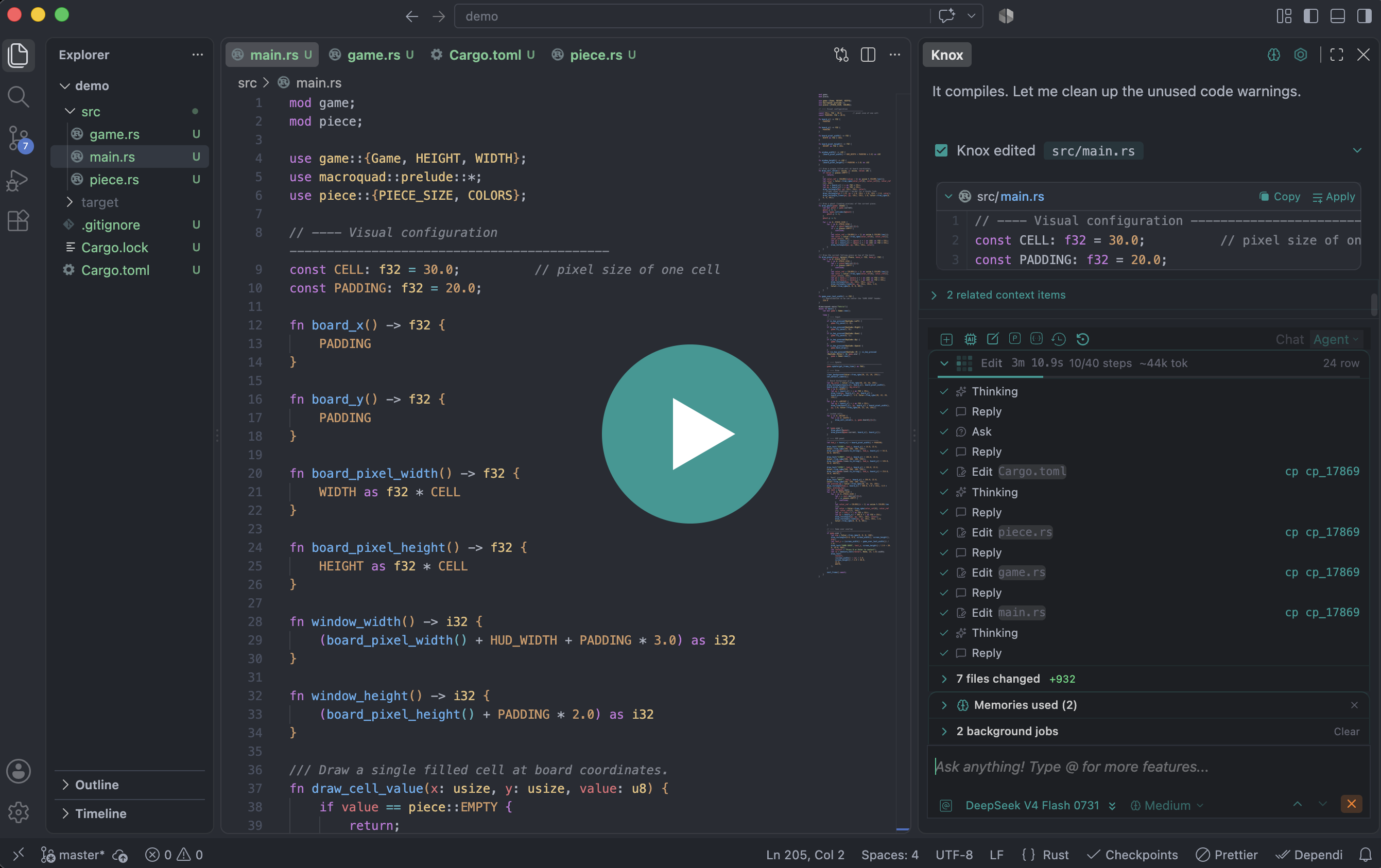
Three systems. One loop.
| Agent | Plans, edits, searches, and verifies — 29 built-in tools, Ask / Edits / Auto permissions, worktree isolation | Cmd/Ctrl + Shift + Alt + A |
| Memory Brain | Local SQLite cognition — hierarchy, knowledge graph, sleep consolidation. No cloud. | Brain icon in the sidebar |
| Checkpoints | Instant rewind of files — or files and what the agent remembered | Restore icon in chat |
Memory Brain
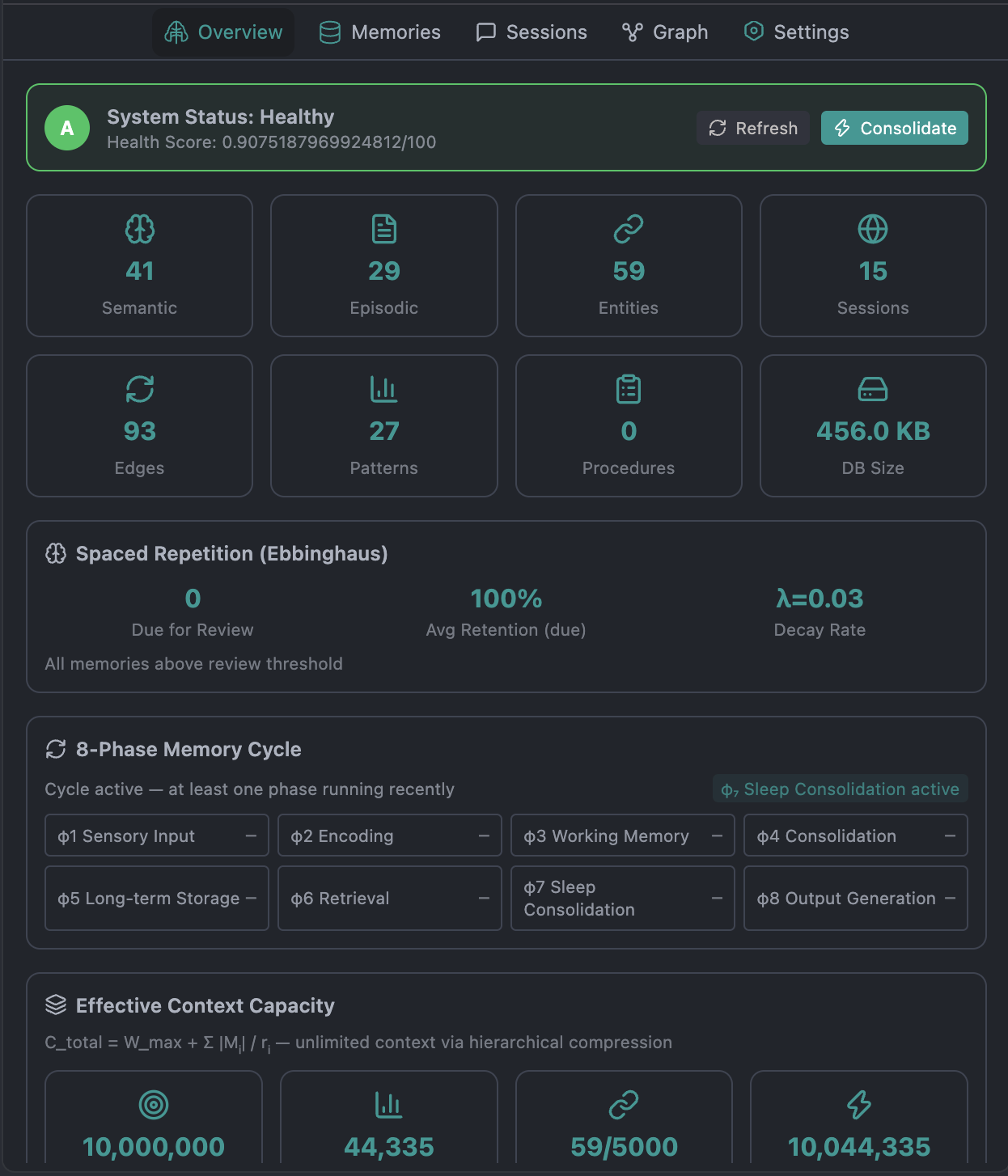
Most assistants keep a handful of notes. Knox runs a local cognitive stack — a SQLite brain at ~/.knox/memory/brain.sqlite that spans every session, compresses what it keeps, forgets what it should, and injects only what the next turn needs.
 |
|---|
Nothing leaves your machine. There is no cloud sync and no remote memory API. Optional AES-256-GCM export is for local backup only.
What it does for you
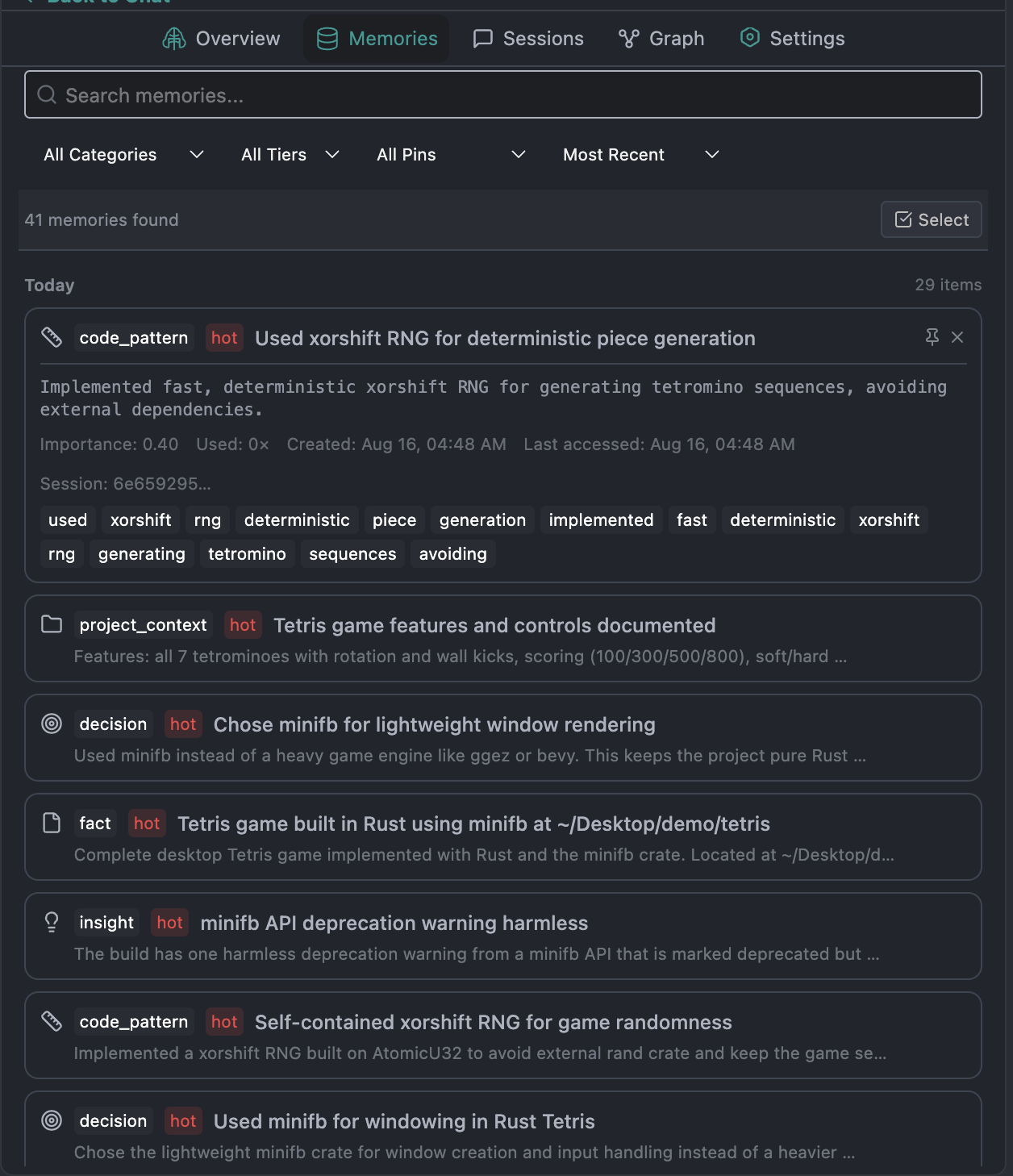
On every chat turn, Knox builds a token-budgeted memory block and injects it as ## Relevant Memory Context. An Injected Memories chip above the input shows what was used and why — pin what matters, forget what does not. If memory is slow, chat continues with a notice instead of blocking.
Memories are extracted automatically after substantial turns (facts, decisions, patterns, error fixes). You can also attach them with @memory.
 |
|---|
Five-tab Memory panel
Open Knox: View Memory or the sidebar brain icon.
| Tab | What you get |
|---|---|
| Overview | Health score, 8-phase pipeline status, M₁–M₅ effective-context dashboard, graph cap, spaced-repetition review, sleep-cycle stats, 24h trend. Refresh and Consolidate. |
| Memories | Search, filter, pin, forget. Mass manage: select / select all / range-select, bulk pin or delete, copy as JSON or Markdown. Date groups: Today / This Week / This Month / Earlier. |
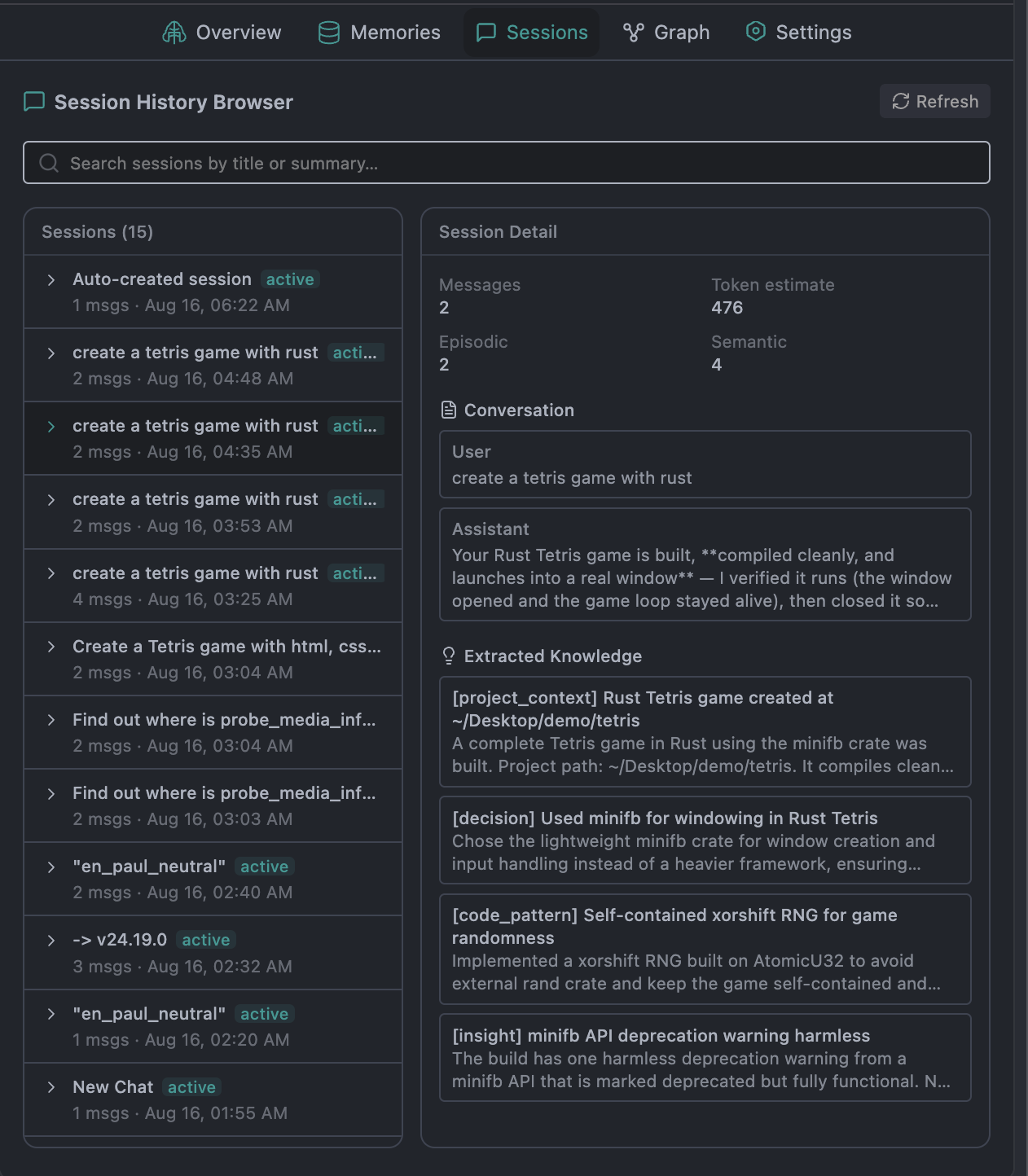
| Sessions | Browse episodic history and extracted knowledge. Cross-session backlog search. |
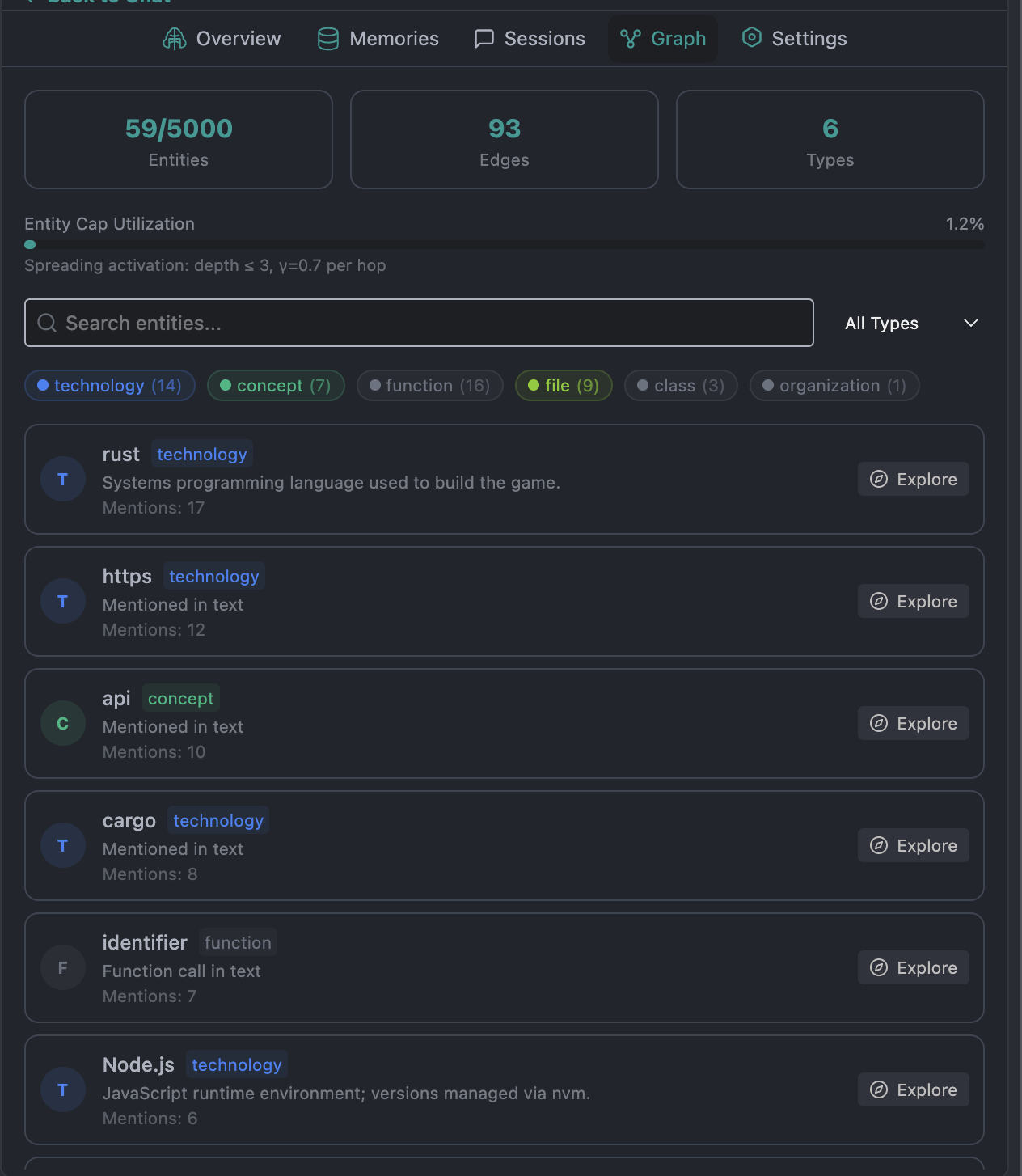
| Graph | Entities and relations (5,000 cap). Search, type-filter, explore neighbors via spreading activation. |
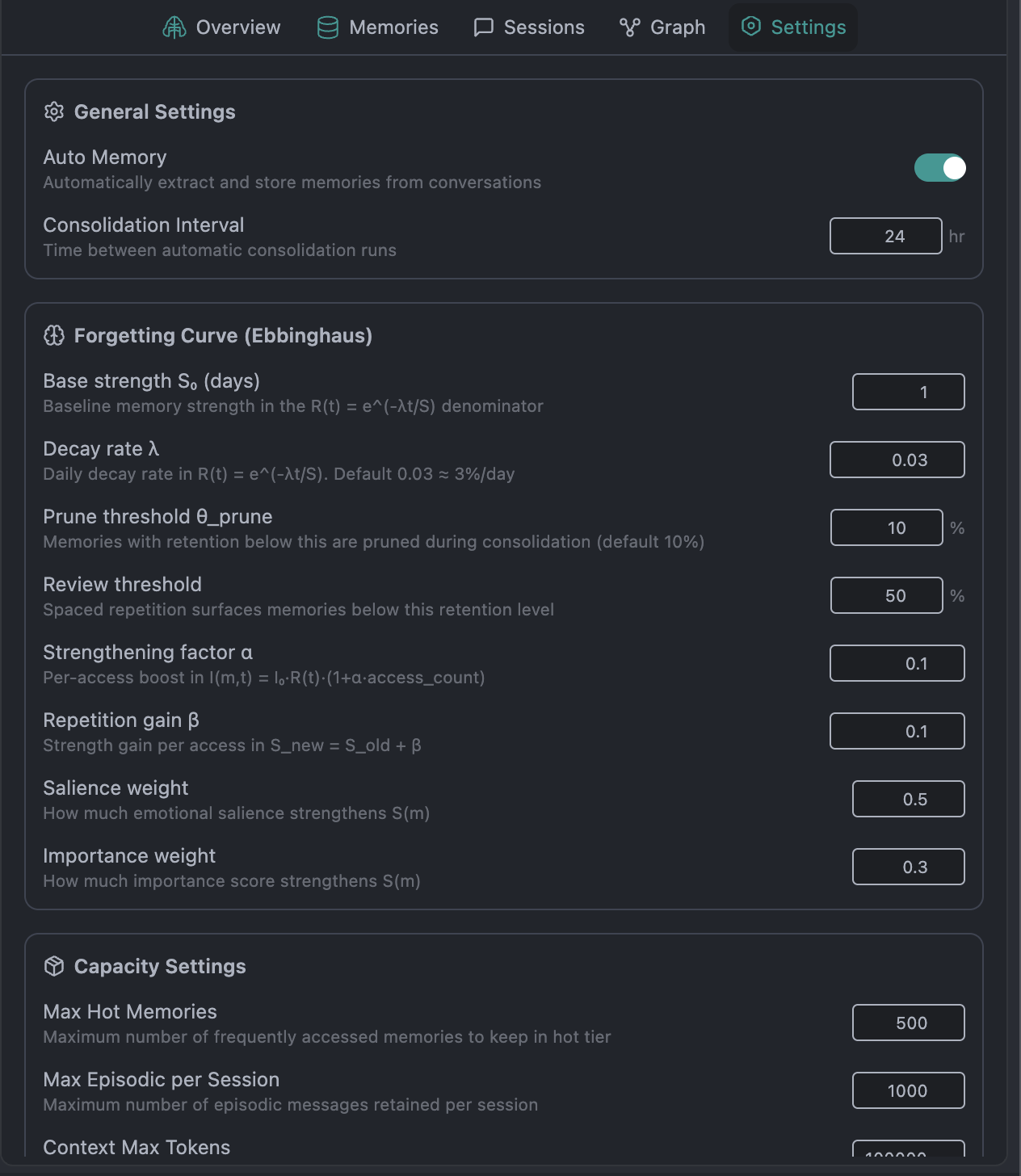
| Settings | Memory mode, project vs global scope, retrieval, working memory, Ebbinghaus curve, knowledge graph, encrypted export/import, heal, purge. |
 |
|---|
How memory thinks
- 8-phase pipeline — sensory capture → encoding → working memory → consolidation → long-term store → retrieval → sleep → context assembly
- 5-level hierarchy (M₁–M₅) — sensory buffer (~250 ms), working memory (7 slots, 30K tokens, 30 s TTL), short-term, long-term, procedural. Compression theorem:
C_effective = Σ |Mᵢ| / rᵢ - Retrieval without embeddings — FTS5 BM25 + trigram fuzzy + graph spreading (depth 3) + recency + importance. Defaults: threshold θ = 0.6, top-k = 20
- Sleep consolidation — NREM replay, Ebbinghaus decay (λ = 0.03), REM distill. Manual Consolidate or every 24 hours. Pinned memories skip prune
- Knowledge graph — people, files, functions, concepts, and weighted edges. LRU at 5,000 entities
- Modes —
full/summarized(default) /selective. Scope — this project (default) or all projects - Sanitized writes — prompt-injection, credentials, and invisible Unicode are stripped; recalled context is fenced so memories are not treated as instructions
 |
|---|
 |
|---|
Agent memory tools
Five first-class tools on the default Agent catalog: builtin_memory, builtin_memory_graph, builtin_memory_sessions, builtin_memory_manage, builtin_memory_learn. Explore/review subagents may recall memory but cannot write it.
/autonomous <goal> runs a local multi-step loop with the memory pipeline on every iteration (default 10 steps).
Agent Mode
An autonomous agent that plans, executes, and verifies multi-step work — with permissions you control, isolation you can turn on, and a stop button that actually stops.
Switch with the Agent tab or Cmd/Ctrl + Shift + Alt + A. One switch: tools, checkpoints, undo, shadow preview, and verification stay in sync. Chat stays text-only; tools run only in Agent.
Permissions you can feel
Cycle Ask → Edits → Auto from the Agent tab or Shift+Tab:
| Mode | Behavior |
|---|---|
| Ask | Reads auto-run. Writes, terminal, and web ask first |
| Edits | File edits auto-run. Terminal and web still ask |
| Auto | YOLO for this session — does not rewrite your saved tool settings |
Every tool card: Deny / Always (this chat) / Approve. Path and command policy (allow / ask / deny globs) is enforced in Core — deny always wins, including in Auto. Defaults block rm -rf, ~/.ssh, and similar; paths outside the workspace ask.
Presets in Tools permissions: Ask on write and YOLO. AGENTS.md, CLAUDE.md, and .knoxrules merge in, with Knox-specific rules winning.
29 built-in tools
The agent reads, edits, searches, and verifies with a catalog that is actually implemented — not a list of stubs.
Files & discovery — read, create, StrReplace edit, write, Codex-style apply_patch (multi-file, atomic), glob, directory tree, repo map, ripgrep, git diff
Shell & jobs — persistent cwd, streamed stdout, auto-background after ~30 s, await_shell to poll or kill. Process-group kill so pipelines stop
Git — status, diff, log, commit. No push, force, or amend. Prefer these over shell git
Orchestration — task subagents (explore / review / general), ask_user (never auto-approved), workspace_checkpoint
Intelligence — LSP (definition, references, hover, symbols, call hierarchy), live web search, on-demand skills, generate tests
Memory — the five Memory Brain tools above
Readonly tools run in parallel when the model emits several at once. Writes stay sequential. After mutating tools, Knox checks diagnostics and can attempt an LLM fix (knoxchat.enablePostEditVerification, on by default), with a per-file circuit breaker.
Isolation, not hope
- Worktree (optional chip) — edits and shell run in a
git worktreeuntil you Apply (copy back) or Discard. Session-long isolation - Shadow preview (
knoxchat.enableShadowPreview, off by default) — side-by-side Accept/Reject before a single Apply. Not the same as Worktree - Undo / redo — real file-byte snapshots.
Cmd/Ctrl + Shift + Alt + Z/Ywhile Agent is active
Stay in control of the loop
- Activity timeline — thinking → reads → searches → edits → tests/shell. Click a step to jump to the tool card. Checkpoint stamps on the timeline
- Turn meter — steps used / max (default 40), estimated tokens, elapsed time, Stop. Stop stays available while a tool is mid-flight
- Jobs panel — detached shell jobs and in-flight subagents. Inspect output, kill, clear finished
- Doom-loop guard — identical tool+args or a failure streak (default 3) forces a text-only summary
- Ask user — mid-run multiple-choice or short answers. Never auto-approved
Checkpoints
Git is for commits you meant. Checkpoints are for everything the agent just did — a rewind that does not depend on git reset.
Snapshots live in ~/.knox/checkpoints/. Restore replays the delta chain so the workspace matches that point in time, including files created later.
 |
|---|
Two restore modes
| What comes back | |
|---|---|
| Restore | Files only. Memory stays. The agent is told memory was not rewound |
| Restore files and memory | Files + linked Memory Brain snapshot + later episodic turns trimmed |
Default is files-only. Memory rewind is opt-in: Shift-click the chat restore button, a timeline cp stamp, or the overlay. After any restore, a system note tells the model not to assume later edits still exist.
When snapshots happen
- Before the first mutating tool of a turn — edits, patch, tests, git commit, or terminal. Always. Empty trees get a baseline
- After an SI reply when workspace files changed (default on)
- Manual — Command Palette Knox: Create Checkpoint, or the agent tool
builtin_workspace_checkpoint - Worktree Apply — a turn checkpoint before files copy back
- Memory bulk delete — one Memory Brain safety checkpoint (separate from workspace snapshots)
 |
|---|
Overlay in chat
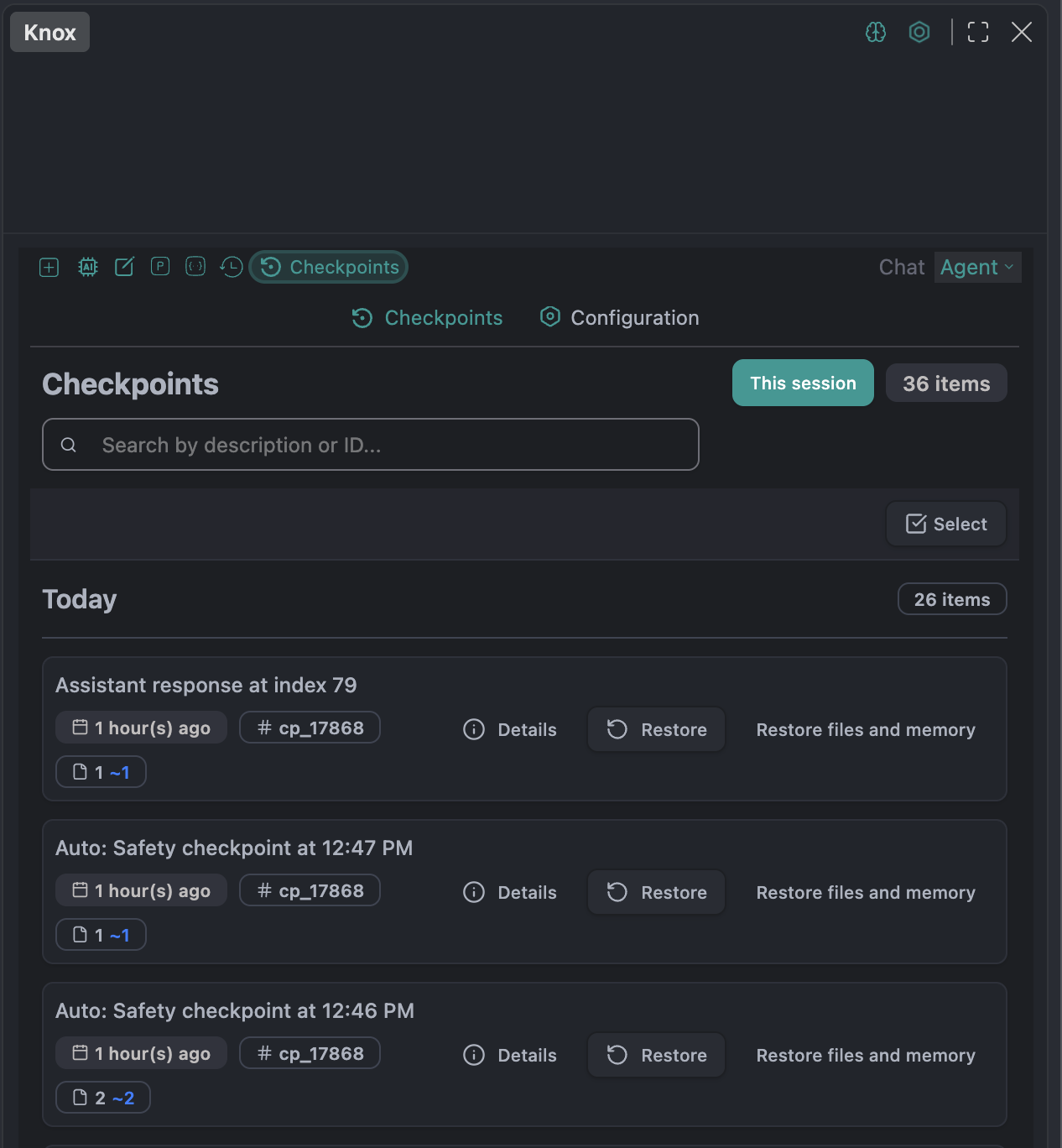
The restore icon in the chat toolbar opens the Checkpoints overlay (list + configuration). Title-bar buttons are gone — you never leave the conversation.
- This session filter (on by default)
- Search by description or ID
- Date groups, file stats, 8-char IDs
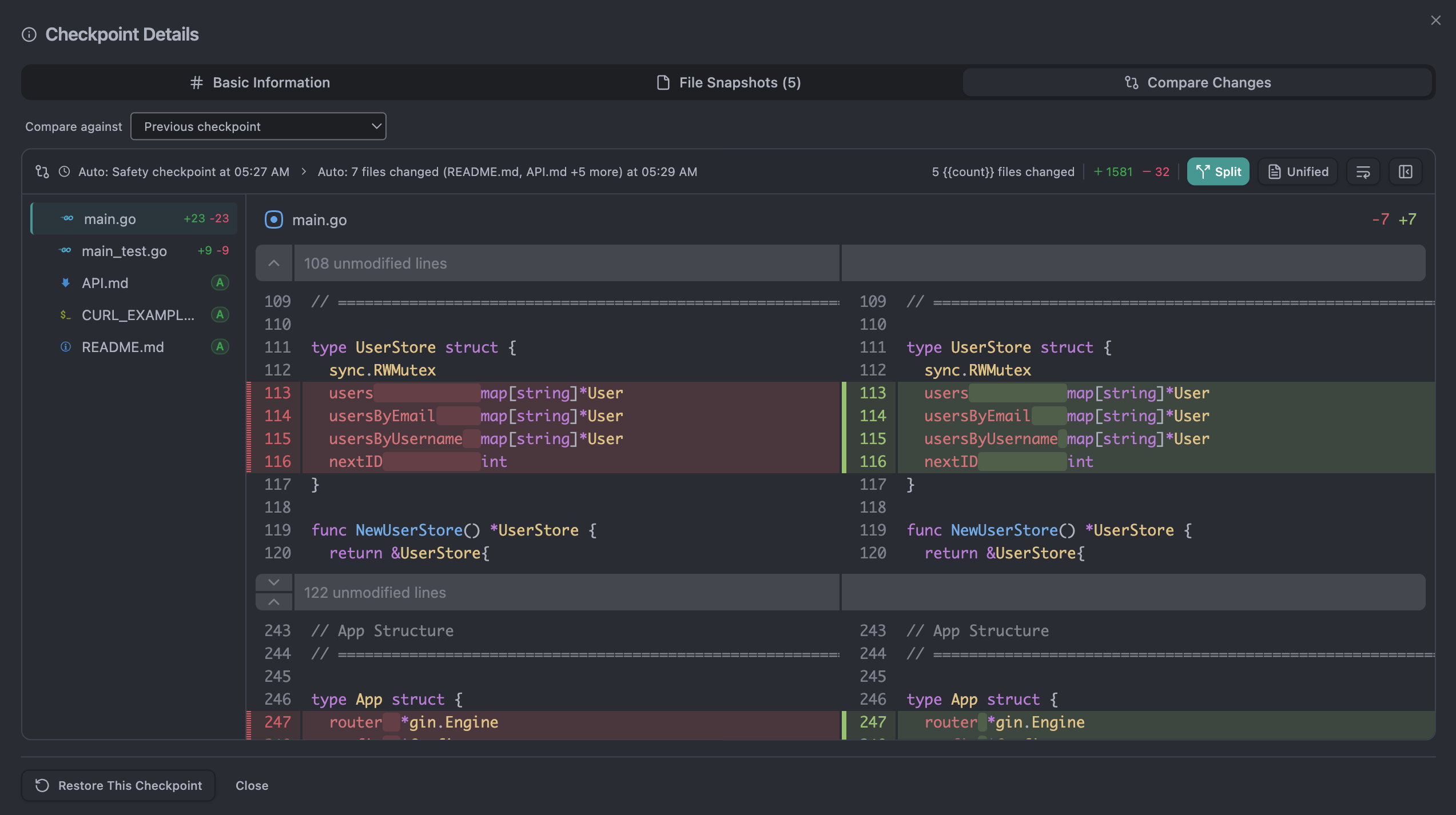
- Diffs vs previous checkpoint, current workspace (preview of restore), or any older checkpoint
- Split / unified views, word-level highlights, single-file restore
- Binary assets (images, fonts, PDFs, wasm) when capture is on
- Multi-select bulk delete
Retention & ignore
Defaults: 1,000 checkpoints, 7-day retention, 5 MB per file, binary capture on, auto-cleanup daily. Tracked extensions cover the usual languages; unknown files are sniffed. .knoxignore, .gitignore, and built-in noisy paths (node_modules/, .git/, dist/, …) are all applied. Knox Checkpoint: Create global .knoxignore ships language presets.
Soul — one session, three systems
This is the product, not a sidebar feature.
One session.id binds the Agent loop, workspace checkpoints, and the Memory Brain.
- The first mutating tool of a turn always creates a workspace checkpoint (
soul-turn-…) - Mutating tools, deny, doom-loop, max-steps, ask-user, worktree apply/discard, and compaction write SoulEvents as episodic memory
- Compaction pins a brain snapshot linked to the last workspace checkpoint
- Restore can rewind files, or files and what the agent remembered
- Memory rollback offers the linked file checkpoint — disk does not move unless you ask
The model, the disk, and the memory stay honest with each other.
SI Chat
A sidebar chat streamed in real time, with tool execution displayed inline when you are on the Agent tab.
- Multi-model — Anthropic Claude, OpenAI GPT-5.5 / GPT-5.6, DeepSeek V4, Gemini 3.7, Qwen 3.8, Grok 4.6, GLM 5.3 and
knox/knox-ms - Role-based routing — assign different models to
chat,edit,apply,summarize,viewRead,realTimeSearch. Cheaper models for reads; your chat model for writes - Sessions — multiple tabs, history overlay in the input toolbar, restore
- Rich context — files, folders, selections, images, terminal, git diffs, and
@providers - Compaction — long threads summarize without dropping memory or plan blocks
Inline Code Editing
Natural-language edits with visual diff review.
Cmd/Ctrl + I— describe a change; Knox streams a vertical diff in the editor- Accept / reject per block —
Alt + Cmd/Ctrl + Y/N - Accept / reject all —
Shift + Cmd/Ctrl + Enter/Backspace - Multi-file batch diffs — review and apply across files in a dedicated panel
- Smart apply — unified diff detection, LLM-assisted lazy apply, or AST fallback
Slash Commands
| Command | Description |
|---|---|
/autonomous | Local multi-step loop with memory on every iteration |
/cmd | Generate terminal commands from natural language |
/commit | Conventional commit messages from staged changes |
/changelog | Changelog from git history |
/issue | Draft GitHub issues |
/pr | Pull request descriptions |
/review | Code review with detailed feedback |
/share | Share content via Knox |
/http | Call HTTP endpoints |
/skills | List loaded skills |
Custom commands live in config.yaml or .prompt files.
Context Providers
Attach context with @. Defaults always available: file, diff, problems, repo-map, terminal, memory.
| Provider | Description |
|---|---|
@CurrentFile | Currently open file |
@FileTree | Project file tree |
@OpenFiles | All open editor tabs |
@Folder | Contents of a folder |
@GitCommit | A specific git commit |
@Diffs | Current workspace git diffs |
@Terminal | Terminal output |
@Problems | VS Code diagnostics |
@Debugger | Locals + stack for a paused debug thread (opt-in) |
@GitHub Issues | Issues from your repo (token-gated) |
@Database / @Postgres | Database context (opt-in) |
@URLs / @Web / @Google | Web content and search (opt-in) |
@ProjectMemory / @memory | Stored conventions and notes from the Memory Brain |
@Clipboard | Clipboard contents |
@RepoMap | Repository structure (tree-sitter symbols) |
@OS | Operating system info |
Context Menu Actions
Right-click selected code:
- Add as Context — send the selection to Knox
- Write Comments / Write Docstring
- Fix Code / Optimize Code
- Fix Grammar / Spelling — Markdown files
Explorer: Select Files as Context
Terminal: Debug Terminal (Cmd/Ctrl + Shift + R)
Where Knox stores data
All user data is global in ~/.knox/ — no project-local .knox/ directory is created. Legacy project .knox/ folders migrate automatically on first launch.
| Path | Contents |
|---|---|
config.yaml | User configuration |
~/.knox/sessions/ | Conversation history |
~/.knox/checkpoints/ | Workspace checkpoints |
~/.knox/memory/brain.sqlite | Memory Brain (local only) |
~/.knox/prompts/ | Global prompt files |
~/.knox/assistants/ | Assistant definitions |
~/.knox/rules/ | Global per-topic rules |
~/.knox/skills/ | Knox-native skills |
~/.knox/.knoxignore | Global checkpoint ignore |
Rules System
Project standards injected into every SI interaction. Later sources win.
Merge order (highest last):
~/.knoxrulesand~/.knox/rules/*.md{workspace}/CLAUDE.md{workspace}/AGENTS.md{workspace}/.knox/AGENTS.md{workspace}/.knoxrules— Knox-specific wins over generic agent files- Nested
{subdir}/AGENTS.mdwalking up from the open file
---
applyTo: ["**/*.ts", "**/*.tsx"]
priority: 10
---
- Use `interface` for object shapes, `type` for unions
- Prefer `const` over `let`
- All exports must have JSDoc
Supports applyTo globs, priority, and template variables ({os}, {arch}, {home}). AGENTS.md can declare always / ask / never path and command policy.
Skills System
Reusable instruction sets that extend Knox.
Discovery:
~/.knox/skills/(global, Knox-native)skills/orskill/in the workspace.claude/skills/,.agents/skills/(project)~/.claude/skills/(global)
Each skill is a folder with a SKILL.md:
---
name: react-components
description: React component development patterns
---
## Instructions
- Use functional components with hooks
- Extract shared logic into custom hooks
@src/components/Button.tsx
List loaded skills with /skills. The agent can load a skill body on demand via builtin_skill.
Prompt Files
Reusable prompts as .prompt files in ~/.knox/prompts/ or project-level .prompts/ / .knox/prompts/. YAML prompts or .prompt files.
---
name: api-endpoint
description: Generate a new API endpoint
---
Create a RESTful endpoint following our patterns.
@src/routes/example.ts
@currentFile
<system>You are an expert backend developer.</system>
Supports @file.ts, @https://..., context providers (@currentFile, @repo-map), system-message blocks, and recursive nesting.
Configuration
Knox is configured from config.yaml in ~/.knox/ and from the in-app Settings page. Memory preferences live in the Memory panel (not settings.json).
VS Code Settings
| Setting | Default | Description |
|---|---|---|
knoxchat.showInlineTip | true | Inline shortcut hints |
knoxchat.enableQuickActions | false | Quick actions on selection |
knoxchat.enablePostEditVerification | true | Diagnostics + LLM fix after mutating tools |
knoxchat.enableShadowPreview | false | Side-by-side Accept/Reject before Apply |
knox.checkpoints.maxCheckpoints | 1000 | Maximum stored checkpoints |
knox.checkpoints.retentionDays | 7 | Days to retain checkpoints |
knox.checkpoints.maxStorageBytes | 1000000000 | Max checkpoint storage (1 GB) |
knox.checkpoints.maxFilesPerCheckpoint | 100 | Max files listed per checkpoint |
knox.checkpoints.maxFileSizeBytes | 5242880 | Max size of a captured file (5 MB) |
knox.checkpoints.captureBinaryFiles | true | Snapshot images, fonts, PDFs, and similar |
knox.checkpoints.enableCompression | true | Compression toggle |
knox.checkpoints.enableAutoCheckpoints | true | Auto-create after SI replies when files change |
knox.checkpoints.trackedExtensions | [js, ts, py, …] | Extra extensions to track |
knox.checkpoints.autoCleanup | true | Delete old checkpoints automatically |
knox.checkpoints.cleanupIntervalHours | 24 | Cleanup interval |
Agent loop caps (experimental.agentMaxSteps default 40, experimental.agentDoomLoopThreshold default 3) and path/command policy are in the in-app Settings / Tools permissions UI.
Keyboard Shortcuts
| Action | macOS | Windows / Linux |
|---|---|---|
| Open Knox | Cmd + L | Ctrl + L |
| Add Selection as Context | Cmd + Shift + L | Ctrl + Shift + L |
| Inline Edit | Cmd + I | Ctrl + I |
| Toggle Agent Mode | Cmd + Shift + Alt + A | Ctrl + Shift + Alt + A |
| Cycle Ask / Edits / Auto | Shift + Tab | Shift + Tab |
| Accept All Diffs | Shift + Cmd + Enter | Shift + Ctrl + Enter |
| Reject All Diffs | Shift + Cmd + Backspace | Shift + Ctrl + Backspace |
| Accept Diff Block | Alt + Cmd + Y | Alt + Ctrl + Y |
| Reject Diff Block | Alt + Cmd + N | Alt + Ctrl + N |
| Debug Terminal | Cmd + Shift + R | Ctrl + Shift + R |
| Undo Agent Operation | Cmd + Shift + Alt + Z | Ctrl + Shift + Alt + Z |
| Redo Agent Operation | Cmd + Shift + Alt + Y | Ctrl + Shift + Alt + Y |
| Accept Shadow Preview | Cmd + Shift + Alt + S | Ctrl + Shift + Alt + S |
| Reject Shadow Preview | Cmd + Shift + Alt + Backspace | Ctrl + Shift + Alt + Backspace |
| Apply Code from Chat | Alt + A | Alt + A |
| Restore files and memory | Shift-click restore / cp stamp | Same |
| Exit Edit Mode | Escape | Escape |
Language & File Support
Knox works across the languages you already use:
JavaScript / TypeScript, Python, Java / Kotlin, C / C++, C#, Go, Rust, PHP, Ruby, Swift, HTML / CSS / SCSS, JSON / YAML, Markdown, SQL — plus custom .prompt files with syntax highlighting.
Internationalization
- English (default)
- Chinese (中文)
Change language from Settings in the sidebar. Agent UI, permissions, jobs, and tool-error cards are localized.
Requirements
- VS Code ≥ 1.125.0
- Node.js ≥ 24.19.0
- An API key for at least one supported LLM provider (Anthropic, OpenAI, or Knox)
Documentation & Support
- Docs: https://docs.knox.chat
- Open VSX: https://open-vsx.org/extension/knoxchat/knoxchat
- GitHub: https://github.com/knoxchat/knoxchat
- Email: support@knox.chat
- Homepage: https://knox.chat