Introducing Knox SI Image Editor - Professional Image Editing with Natural Language

Edit images like you're talking to a designer. No buttons. No sliders. Just natural language.
Today, we're thrilled to announce big update to Knox yet: Knox SI Image Editor - a professional-grade image editing suite powered by Gemini 2.5 Flash Image, a.k.a. "Nano Banana,". This isn't just another filter app. This is a complete reimagining of how humans interact with image editing tools.
 |
|---|
Why We Built This
Traditional image editors like Photoshop have a problem: they're incredibly powerful, but take months to learn. Meanwhile, simple filter apps are easy to use but limited. We asked ourselves: what if you could have both?
What if you could:
- Say "make this portrait look like a magazine cover" instead of spending 30 minutes with adjustment layers?
- Try 30+ professional styles in 30 seconds instead of learning manual techniques?
- Edit specific regions by just circling them instead of mastering selection tools?
- Track all your edits visually instead of losing good versions?
That's exactly what we built.
What Makes Knox SI Image Editor Different?
1. Natural Language = No Learning Curve
Instead of this (traditional):
1. Open image
2. Duplicate layer
3. Adjust curves
4. Modify hue/saturation
5. Add vignette
6. Fine-tune shadows
7. Export...
Do this (Knox):
"Enhance this portrait with professional retouching,
vibrant colors, and subtle vignette"

Press Enter. Done. ✅
Real users are getting professional results in seconds, not hours.
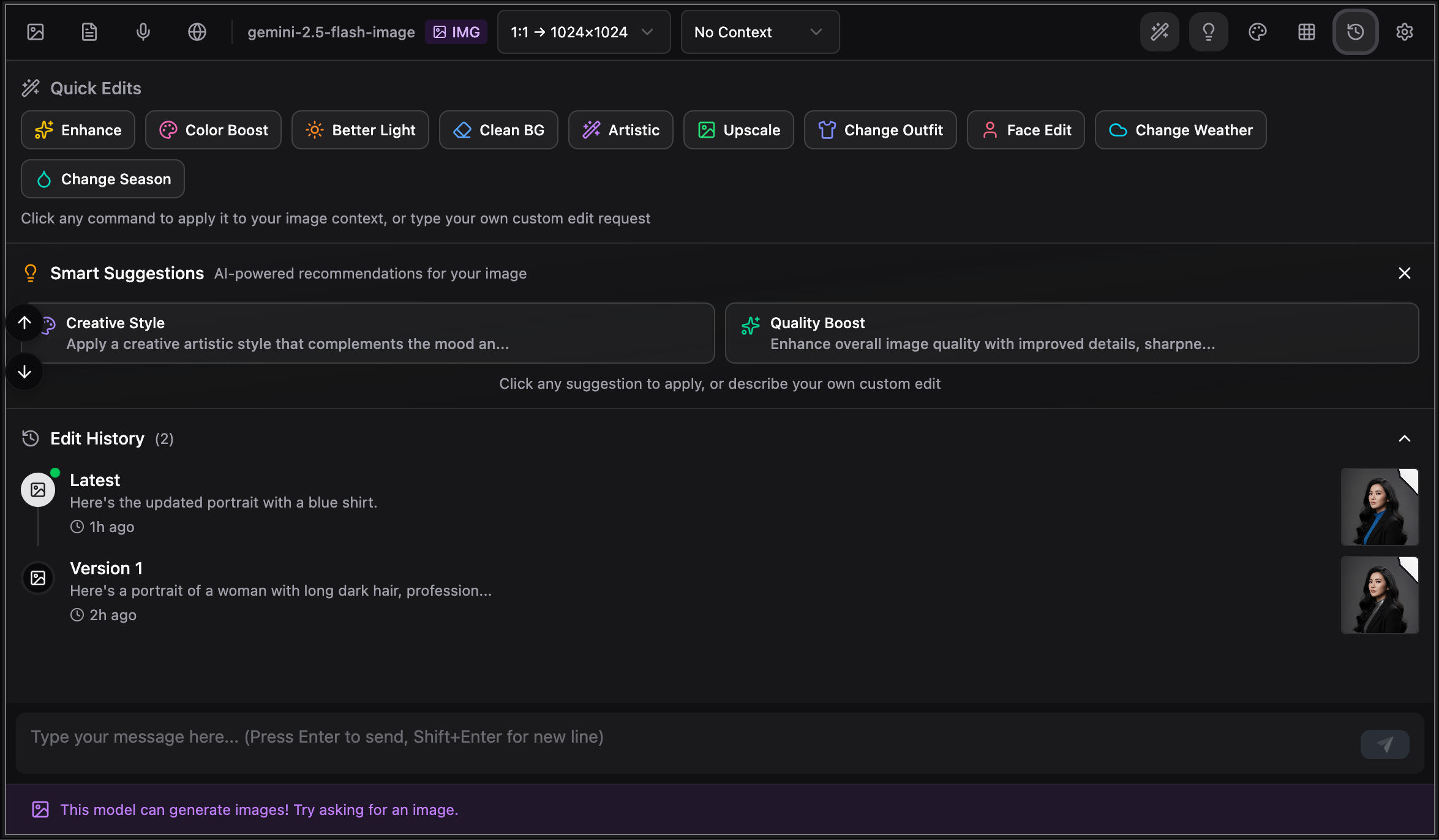
2. 11 Powerful Features in One Interface
We didn't just add "SI filters." We built a complete editing ecosystem:
Quick Edit Commands
10 preset commands for instant transformations:
- Enhance quality
- Boost colors
- Improve lighting
- Clean backgrounds
- Artistic styling
- Upscale resolution
- Change outfits
- Face editing
- Weather effects
- Season transformations
One click. Instant results.
Style Transfer Gallery
30+ professional artistic styles across 4 categories:
- Artistic: Oil Painting, Watercolor, Sketch, Abstract
- Photography: Vintage, Cinematic, HDR, Golden Hour
- Anime/Cartoon: Studio Ghibli, Pixar, Disney
- Effects: Cyberpunk, Vaporwave, Neon, Pixel Art
No Photoshop skills needed. Just click and apply.
Professional Image Viewer
Full-featured viewer with:
- Zoom (10%-500%)
- Pan & Rotate
- Annotation tools
- Region selection for precise edits
Draw on what you want to edit. The SI understands.
Smart SI Suggestions
Context-aware recommendations based on your image:
- Detects portraits → Suggests "Enhance Portrait", "Glamour Shot"
- Detects landscapes → Suggests "Dramatic Lighting", "Time of Day"
- Detects architecture → Suggests "Architectural Enhancement"
The SI analyzes your image and suggests the best edits.
Edit History Timeline
Visual timeline of all your edits:
- See all versions
- Jump to any point
- Compare before/after
- Never lose a good version
Version control for your creativity.
Before-After Comparison
Interactive comparison with two modes:
- Slider mode (drag to reveal)
- Side-by-side mode
See exactly what changed.
Image Gallery
Complete library for your conversation:
- Grid or list view
- Search by description
- Favorite important versions
- Download collections
Organize your creative session.
Multi-turn Image Context
Use previous images as context:
- "Use Previous One" - Continue editing same image
- "Use Previous Ten" - Batch process multiple images
- Seamless iterative refinement
Build on your work conversationally.
Aspect Ratio Control
10 optimized ratios:
- 1:1 (Social media)
- 9:16 (Stories)
- 16:9 (Widescreen)
- And 7 more...
Perfect dimensions for any platform.
Keyboard Shortcuts
Lightning-fast workflow:
Cmd+K- Focus inputS- Open stylesG- Open galleryH- View history- And more...
10x faster for power users.
Real Use Cases
For Photographers
Original photo → "Enhance with cinematic color grading"
Result: Magazine-quality edit in 3 seconds
For Social Media Managers
Product photo → Try 5 different styles
Gallery view → Pick the best
Export → Post to Instagram
For Digital Artists
Sketch → "Transform to oil painting style"
Context ON → "Add dramatic lighting"
Context ON → "Make colors more vibrant"
Result: Professional artwork through conversation
For E-commerce
Product image → "Studio lighting, clean white background"
Batch mode → Apply to 10 products
Download all → Ready for catalog
How It Actually Works (Demo)
Let's walk through a real editing session:
Scenario: Portrait Enhancement
Step 1: Generate base image
"Professional portrait of a woman, modern style"
✅ Image generated
Step 2: Quick enhancement Click 🪄 Quick Edits → Select "Enhance" ✅ Quality improved
Step 3: Style application
Press S → Choose "Cinematic"
✅ Style applied
Step 4: Fine-tuning
"Add subtle warm glow"
✅ Custom edit applied
Step 5: Compare & save
- View in Edit History
- Compare with original
- Download favorite version
Total time: 90 seconds
Traditional editor: 30+ minutes
Skill required: Zero
Who Is This For?
Perfect For:
- Photographers who want speed
- Social media managers who need variety
- E-commerce teams who process hundreds of images
- Content creators who lack editing skills
- Digital artists who want SI assistance
- Anyone who values time over complexity
Maybe Not For:
- Professional retouchers who need pixel-perfect control
- Users who enjoy manual editing workflows
- Teams with existing Photoshop workflows
Basically: If you want results fast, this is for you.
Technical Innovation
Built on Cutting-Edge SI
Powered by Google Gemini 2.5 Flash Image models:
- Advanced image understanding
- Multi-turn conversations
- Image generation + editing
- Context awareness
Smart Architecture
- Context Management: Automatically includes previous images
- Region Detection: Understands annotated areas
- Content Analysis: Detects image type for suggestions
- Version Control: Tracks all edits automatically
Performance
- Sub-second UI: Instant response
- Web-based: Works anywhere
- Responsive: Mobile, tablet, desktop
- Real-time: See edits immediately
Power User Features
For those who want to push the limits:
Batch Processing
1. Generate 10 product images
2. Context: "Use Previous Ten"
3. Apply: "Studio lighting, white background"
4. All 10 images transformed
Style Blending
1. Base image
2. Apply: "Cinematic style"
3. Context ON: "Add watercolor texture"
4. Context ON: "Subtle oil painting strokes"
= Unique blended style
Precision Editing
1. Open in viewer
2. Draw on problem areas
3. Type: "Fix overexposure in marked regions"
4. SI targets only those areas
Keyboard Workflow
Cmd+K (focus) → Type edit → Enter →
S (styles) → Pick style →
G (gallery) → Review →
Download
= Professional workflow in seconds
Getting Started (3 Minutes)
Step 1: Select Model (30 seconds)
- Go to Knox.Chat
- Select
google/gemini-2.5-flash-imagein Chat >>> - Select one created API Key which you have already created with Keys >>>
- Done
Step 2: Generate First Image (1 minute)
- Type: "Professional portrait with modern lighting"
- Press Enter
- Image appears
Step 3: Start Editing (1 minute)
- Try Quick Edit → "Enhance"
- Try Style Gallery → Pick any style
- Type custom edit
- You're now an image editor!
Total setup: 3 minutes
Total learning: None needed
Total cost: Usage-based (see pricing)
What's Next?
This is just the beginning. We're already working on:
- Video editing with natural language
- Audio editing capabilities
- Team collaboration features
- Cloud storage integration
- Custom style creation and sharing
- Mobile apps (iOS & Android)
🎊 Join the Revolution
Image editing should be this simple:
- Describe what you want
- Press Enter
- Done
No more:
- ❌ Watching tutorials
- ❌ Learning tools
- ❌ Clicking through menus
- ❌ Fighting with selections
- ❌ Losing good versions
- ❌ Spending hours on simple edits
Just:
- ✅ Type
- ✅ Press Enter
- ✅ Get results
This is how image editing should have always worked.
🚀 Try It Now
Ready to experience the future of image editing?
🎯 Final Thoughts
We believe creativity shouldn't be blocked by complexity.
With Knox SI Image Editor, we've made professional image editing as simple as having a conversation. Whether you're a seasoned photographer or have never edited an image in your life, you can now create stunning visuals in seconds.
The future of image editing is conversational. And it's here today.